
“Box modeling for beginners ” by Magic Wand
3Dtutorials.sk recommendation:
To maximise the realism of your 3D rendering we recommend using high quality photo textures from the #1 texture website www.environment-textures.com
Hi friends,
Today we are going to try our hands on that incredible Modeling Technique in 3ds Max, “The Box Modeling” we’ll be creating a simple SUV model from a Box
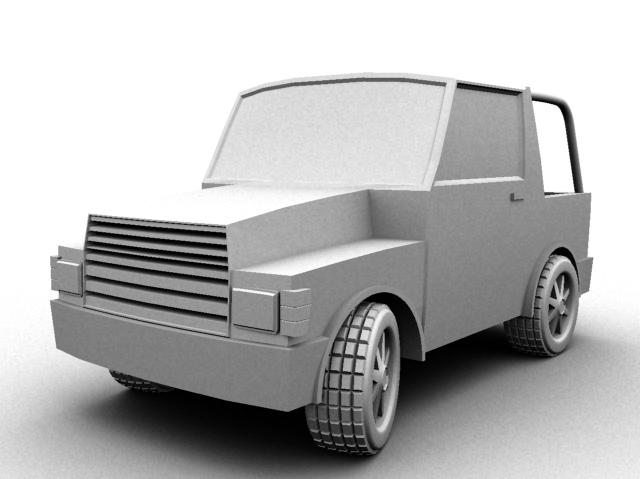 Before that I assume that you are having that basic idea in Max.
We’ll start our things by placing a box in the viewport with these dimensions 90,50,50 and for the segments, we’ll go for 6,6,6
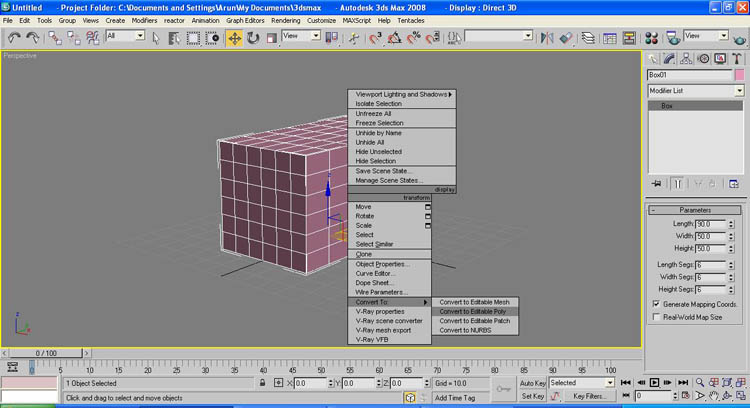
After that we’ll convert our Box into an Editable Polygon(Right click>convert to>Editable poly)

Then select the polygon sublevel and select the Polygons shown in the picture, we are going to make the front area of our SUV



Could you please make a tutorial on how to do the axles and animate the suv.
GREAT TUTORIAL
THANKS HAROLD
Could you please make a tutorial on how to do the axles and animate the suv.
GREAT TUTORIAL
THANKS HAR5OLD.
I dont know if you still check the comments, but can you tell me how you made the tyres using the extruded ngon and the chamfer cylinder? I have no idea as to what happened there
Segmentaion lines does not appear and i can not select faces to make extrude
i use 3D Max 2011
How do you get the grids onto your starting box?
nice tutorial . let me share !!
hello i really need this tutorial is great but i can’t do the shape of the wheel would you mind sending me the full tutorial or help me please. thank you very much
nice work! Please can ANIM8OR work with these tutorials?
Thanks! but my 3D creator software is ANIM8OR and I just downloaded it, do You think this tutorial can be usable for my software?and by the way can I get 3D max free?
hy it s realy nice. thank you
plzz send full tut… plzzz
I think i got a great oppertuanity to join here. so i will learn the new things and improve my working through this wonderful website. thanks
hey!i dont undrestand how you make the wheels arches in start of page 3…can you be more specific.thank you for the time
that was cool 🙂 simple but effective. thanks for effort and time.
i dont have a working 3dmax program yet, the 3d max8 i instaled on my pc has refuse to run on OS(vista) but i will try this technic in another 3d programme that i have(anim8or) and see how it work
still got a problem with the website···
Hi Jade, whats your problem? Maybe you could be more specific (and a bit more polite). Then someone may be kind enough to help you 🙂
What a shit tut, i got lost on the start on the second page!
I have 3ds max 7 and dont really understand i just got max 7 so is there any chance you could explain this in more detail
hey, there seems to be an issue with this tutorial, as if its missing a page inbetween page one and two, it just jumps a whole section.
oooohhh! i was a problem with my final year project thank you
I´m really a beginner and just learning to understand how this programm works. I don´t understand how you how you managed to add another segment to an excisting editable poly like you did in the last picture from page 2 to create the difference in hight on the roof. I thougt you did it by cloning and spliting the segment behind to windows, but when I do this, and move it, I deform the whole car. Please explain.
we are sorry, there was a small problem with this site which is now resolved.
this is helpful but theres only one page!!!! -.- …………….. it repeats